How to Choose The Right Podcast Equipment for Your Team
Starting a podcast is one of the most effective ways for teams to share knowledge, communicate updates, and build stronger connections with employees or customers. The good news is that you don’t need a professional studio or an expensive setup to create high-quality episodes.
A team podcast works best when the setup feels dependable, modest, and easy to repeat.
The right kit helps leaders record updates, trainers explain procedures, and staff listen during normal work without extra steps or technical strain.
Start With Clarity
Before anyone buys hardware, the team should define speaker count, episode length, and listening purpose. A weekly leadership note needs a lighter setup than a roundtable.
For a practical baseline of what equipment is needed for a podcast, focus first on microphones, headphones, recording software, and a quiet room, because those choices shape clarity before any accessories matter.
Choose The Right Microphone
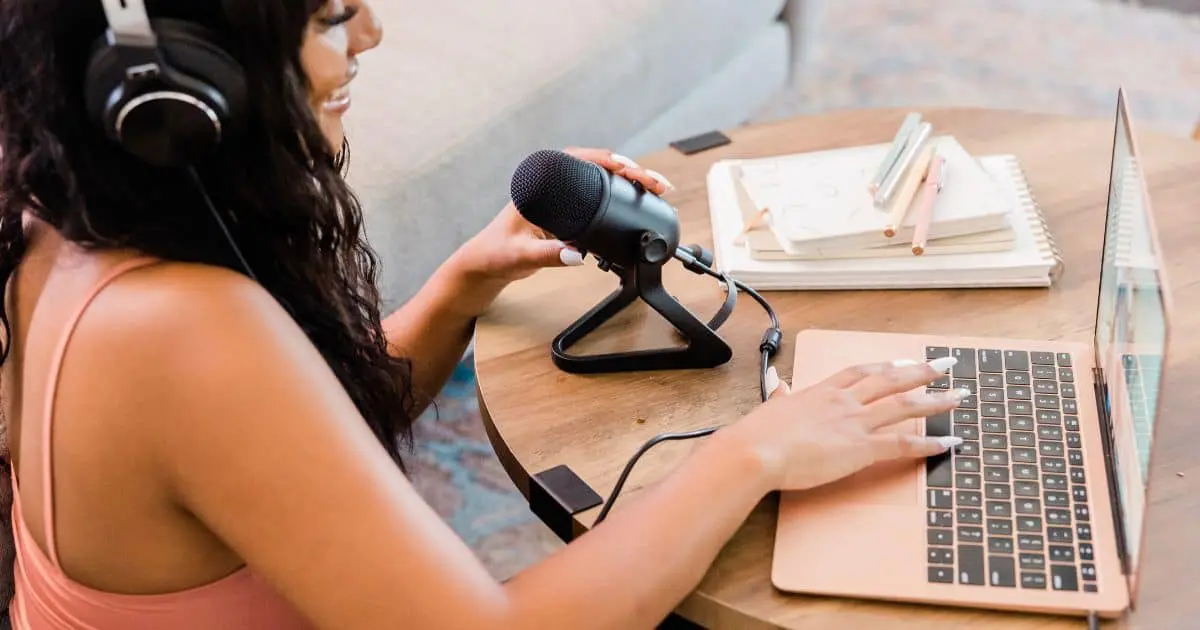
The microphone has the largest effect on perceived quality.
Harsh, thin, or distant speech makes listeners work too hard. USB models are compatible with most starter programs because they plug directly into a computer.
XLR microphones give stronger control, but they require an interface.
Dynamic models are usually kinder in offices because they reject more room noise.
Use Closed-Back Headphones
Headphones let speakers hear problems before they become permanent. Closed-back designs reduce leakage, so recorded tracks stay cleaner. Wired pairs are usually steadier than wireless options during interviews.
Every participant should wear them, especially during remote sessions. That single habit helps prevent echo, feedback, and distracting level changes.
Pick Simple Recording Software
Recording software should support the workflow, not become the project. Audacity, GarageBand, Zoom, and browser-based recorders can all work for early production.
Separate tracks are valuable because each voice can be cleaned and balanced later. The right choice is the one a busy team can use without hesitation every week.
Match Gear to Format
A solo update may need one USB microphone, headphones, and a quiet office. A remote interview needs stable internet, separate monitoring, and dependable recording software.
An in-person group usually requires individual microphones plus an audio interface. The format should guide each purchase, so the setup stays useful rather than becoming cluttered.
Prepare The Recording Space
The room shapes sound before editing begins. Smaller spaces with carpet, curtains, or full bookshelves usually control echo better than glass conference rooms.
Speakers should silence notifications, turn off fans, and keep microphones away from keyboards.
Consistent placement also matters. A familiar distance from the mic keeps volume steadier across episodes.
Add Accessories Carefully
Accessories help when they solve a known issue.
A pop filter reduces sharp bursts of breath. A boom arm keeps the microphone steady and clears desk space. Quality cables prevent crackle during important recordings. Shock mounts can limit vibration from taps or movement. Add these pieces after the core setup proves reliable.
Plan for Multiple Speakers
Group recordings require planning because a shared microphone rarely produces balanced audio.
Nearby voices dominate, while quieter people sound distant. Individual microphones give each speaker a defined presence. An audio interface connects those sources to a single computer. For remote guests, local track recording protects quality when internet connections drop or distort sound.
Keep Editing Practical
Editing should protect attention, not erase natural speech. Trim long pauses, remove obvious mistakes, reduce background hum, and level volume between speakers.
Heavy processing can make voices sound artificial. For internal shows, clarity matters more than dramatic effects. A clean, human conversation usually serves employees better than a glossy production style.
Do Not Ignore Hosting
Publishing needs the same care as recording. Internal podcasts often contain company updates, training material, or employee guidance, so access control matters.
Private hosting keeps episodes away from public directories. Individual listener permissions are safer than shared links because access can change when people join, move roles, or leave the organization.
Make Listening Easy
Employees are more likely to listen when episodes appear in familiar podcast apps. Extra portals, hidden links, and repeated logins reduce follow-through.
Distribution should match daily habits, especially for onboarding, training, and leadership communication. Mobile access is important because many people listen between meetings, during commutes, or while handling routine tasks.
Avoid Overbuilt Setups
Large studios can look impressive while slowing actual publishing. Mixers, cameras, lights, and advanced processors are unnecessary for most internal audio programs.
Extra equipment adds setup time, maintenance, and failure points. A compact kit used every week provides more value than a complex room that only trained staff can operate.
Conclusion
Successful podcasting starts with reliable basics. Teams need a clear microphone, closed-back headphones, simple recording software, and a quiet space. Multi-speaker formats may require an audio interface with separate microphones.
Secure hosting and easy distribution are just as important as sound quality. When the process feels manageable, teams record more often, publish with confidence, and build a communication habit people can trust.