How to Use Link Parties to Grow Your Blog: The Ultimate Guide
This is a guest post by Maria Bonacci of The Krafty Planner.
Hey, Maria. Tell us a bit about your blogging journey.
Hey, Lidiya. Long story short… I started blogging back in December of 2012 on the Krafty Owl but shut everything down at the end of 2017 due to a few personal issues.
After a while, I missed blogging and all of my online friends so in February 2019 I started the Krafty Planner. And basically, here we are!
So, what are link parties exactly?
Link parties (also known as, blog parties or link-ups) are like virtual gatherings where bloggers come together to share their latest posts and connect with one another.
They are a fantastic way for bloggers to showcase their content, discover new blogs, and build relationships within the blogging community. Think of it as a fun and informal way to network and support each other’s work.
When did you first learn about them and how did your first ones go?
I first learned about blog parties back in 2013. I was brand new to blogging, scared, and unsure of myself but I shared my posts at a couple of parties anyway. The next week one of my posts was featured at a big party and I was hooked!
It’s been so long that I can’t really remember if I noticed a traffic spike or anything like that but I’m sure there was and I probably received a few extra comments from visitors from the party.
It was mostly the emotional impact that stayed with me. There was a sense of excitement and satisfaction when I saw that my work had been featured. This recognition provided a type of validation and confirmed that people liked what I was doing. It kind of felt like getting an A on a test.
What are the exact benefits of participating in a link party for bloggers?
Link parties provide a free platform for bloggers to promote their content, discover new people in the blogging community, and expand their networks. All without social media.
Plus there is a ton of inspiration, you will always find a new recipe to try, printables to use, a craft to make, or a place to visit.
What results have you seen so far?
I know you want to hear about the stats but over the years I’ve made so many new contacts and friends through link parties which has opened me up to new opportunities I never would have had.
I’ve collaborated on projects with bloggers I met through parties and even joined a mastermind group in 2020 with someone I met through a party back in 2014. (I’m no longer in that group)
Now for the stats… It’s hard to narrow it down to the results from just one party but I checked my stats from last week and in general, I received 28 page views from the company that hosts the link party software. That’s traffic from anyone who clicked a link from a new or old party.
I also received 32 page views from blogs that featured my posts either this week or in the past. These links come from the bloggers who share the party because the link is directly on their blog, not in the party widget from the software company.
Can any blogger in any niche participate in them?
Yes! … Well, not everyone as most parties do not allow adult content, gambling, etc. But, yes, any family-friendly niche is welcome to participate.
Each party has its own guidelines and some have a specific theme, like recipes only or handmade crafts only, so it’s always a good idea to read the party rules, especially if it’s your first time linking up.
Most parties have a limit, usually 3, on how many posts you can share so you will want to check that too.
The word rules make it sound a bit harsh, but it’s not. Basically, they are guidelines the hosts would like you to follow. If you don’t follow the rules they might remove your post from the link-up but I have never seen this happen.
Walk us through the exact process of participating in your link party, using your latest one as an example.
When a party is open, scroll to the bottom of the links.
Click on the blue +Add Link button to expand the link options.

A box will appear and type the URL of your link in the URL field. Images will be loaded automatically in the area below.
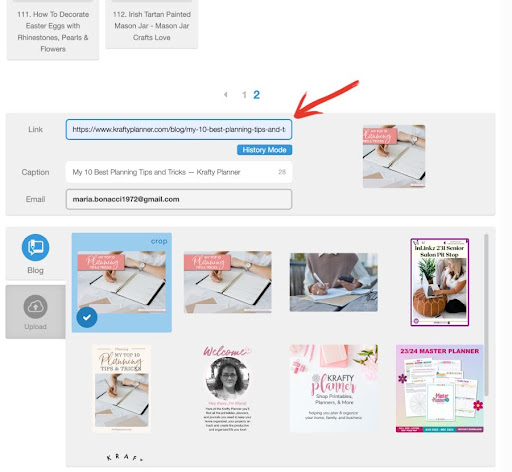
If you’ve linked up in the past you can click the History Mode Button which lets you access your last 10 shares. This is where you can change the Caption Text. Your Email address will be entered automatically.
Select one of the images listed in the area below or you can upload an image manually with the Upload tab. You will also have the option to crop the image so it looks exactly the way you want it to look.
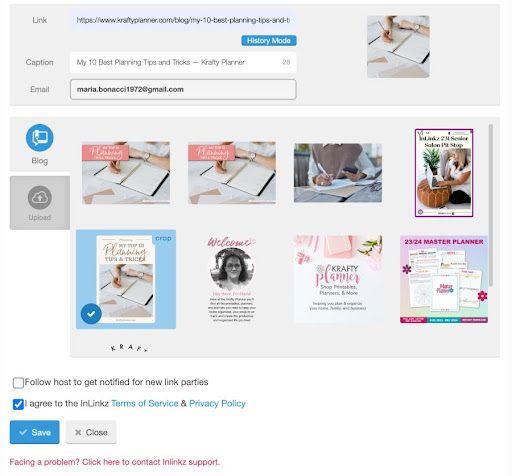
Save your submission and click Done to see your link added to the party grid.

After you click done, you can start the process all over again and add more links.
That’s it! It takes less than 20 seconds to add a link. If this is the first time you’re sharing at a party, you will have to create a free inlinkz account. It’s a simple process but you can see a short video here.
What about hosting a link party? How does this work?
In order to host a party you need an active account with inlinkz. They have a free option that is okay if you’re just starting out, but the party will be limited to 50 links so you will want to upgrade at some point.
Once you have the inlinkz account, you need to create the party code to insert on your blog. I don’t have an account and cannot explain this part so here is a video from inlinkz if you want to see the process.
What about co-hosting?
Co-hosting is basically the same as hosting except you don’t need to have the inlinks account. The main host will need an account to create the code and they will send it to you to insert in your post and create the link-up.
My main host, Esme, sends an email every Wednesday with all of the information we (the co-hosts) need to create the party for the following Monday morning.
Once you agree to be a co-host you are agreeing to post the party each week at the designated time. We have our own set of rules that we follow as a group to make sure we are all doing the same thing each week.
For example, we all share features from the previous week, comment on some of the shared posts to thank the blogger for joining the party, pin the featured posts to a group board and to our individual boards, etc. Some of us share our features on social media and others don’t that’s a matter of personal preference.
All of our co-hosts are great but it’s not always easier with co-hosts. Our party had one host that didn’t do any of the things I mentioned above even though she had been asked multiple times. Unfortunately, she is no longer a co-host.
As far as going solo, sure, you can be a co-host for one party and host your own, different, party the next day.
If you are interested in becoming a co-host of a party you enjoy, reach out to one of the hosts and ask if they are open to adding new co-hosts. Also, be sure to ask about what your responsibilities will be to make sure you don’t overextend yourself.
How often do you host and participate in link parties? And how many hours does it take you weekly?
I know some bloggers host multiple parties each week but I only co-host the one.
It opens on Monday mornings and closes on Saturday afternoons. You can add your links anytime during that period. Once the party is closed, the Add Link button will be gone and there will be text that says- this party is closed.
I participate in anywhere from 1-8 parties a day and normally add 3 links to each party. The whole process is pretty quick and takes just about one minute for each party.
Sometimes I leave a “thank you for hosting” comment on the blog but not always. It’s also nice to click on a link or two and visit someone else’s blog. If they have comments enabled, it’s customary to let them know you’re visiting their post from that specific party.
It can take a few extra minutes if you’ve been featured because in this case you should comment and thank the host/s for the feature and then I always add the “featured” image to my blog post with a link back to the party.
Do we need to do link parties regularly to see results?
I don’t think so. Sometimes I don’t share anything at all. It has more to do with the topic of the blog posts you share at the party.
For example, if you share one post everyone loves, you will get a lot of clicks and most likely a feature next week. But if you share 3 posts no one is interested in, you might not get any clicks at all.
Is the traffic and engagement coming from a link party only during and right after it, or can it continue indefinitely?
The traffic you get from a party can continue indefinitely or for as long as the host blog is online. I don’t delete or move any of the old link party posts and you can access all of them anytime.
Let’s say you’re having a Christmas-in-July party and need some holiday inspiration. Any of the parties from November and December will have all kinds of ideas from recipes and decorating to gifts and stocking stuffers.
Do we need to have comments enabled on our blogs to participate in a link party?
No, you don’t. People will come to visit from the party and look for a place to comment and say hello but it’s your choice if you want to have comments on your blog or not.
But, I should mention that if you are a host/co-host it would be a good idea to have comments enabled for the bloggers that link up to say hi and thank you for hosting.
How do you track the results from a link party?
It’s hard to track the results from an individual party because all of the referral traffic comes from inlinkz.
For example, if I link up 2 posts to 5 parties and get 10 clicks total coming from inlinkz. I will know which posts they went to but I won’t know which party they came from.
I do check the total number of inlinkz referrals weekly when I record my traffic stats.
Any tools you use for link parties?
No, as a blogger sharing your posts, you do not need any tools to participate in parties. It’s a good idea to have a great photo to grab the reader’s attention in the link-up grid.
If you’re hosting, the only tool you need is inlinkz as I mentioned earlier. However, co-hosts do not need this, only the main host.
What about the SEO effect of all this?
I make sure the SEO for my blog post is good and I visit all of the featured blogs to make sure they are reputable before linking back to them.
All of the links are do-follow, but only the featured links. All of the shares at the party are stored on inlinkz and not really on my site as I mentioned earlier.
Yes, each party has its own unique post each week that lives forever on my site to preserve the links and shares. If I deleted one of the party posts, it would create broken links across multiple blogs, not just mine.
Tell us about your Link Party Directory. Do you participate in all of these?
Many of the hosts will ask you to share a link to the party on your blog letting people know that you linked up with them.
Some bloggers include the links on each individual post but I find it easier to have everything in one place like the directory. Then I include this sentence at the bottom of each post whether I’ve linked up or not.
“See my Link Party Directory for a current list of blog parties I attend each week.”
Are you busy with link parties almost daily? If so, how do you balance that with other blogging activities?
Yes and no. Some days/weeks I don’t share at all, especially if I don’t have any new blog posts that week or I am busy with other responsibilities.
I balance the parties with other daily tasks by using Feedly to follow the blogs I like instead of subscribing to all of their emails.
When a new post is published, it appears in my feed. Whenever I check my email I also check my Feedly account. If there is a new party posted and I have a post to share, I will go link up then.
How many page views have you received from link parties in the last 3 months?
I pulled my stats for the last three months (Dec. 1, 2023 – March 1, 2024) and took screenshots of a few lines to see how things went.
In total, I received 805 pageviews from inlinkz parties during that time.
The other traffic is coming from my posts being featured at a party on that blog.
Any last words? And where can people find you online?
Participating in link parties won’t get you thousands of pageviews every day but you will get new subscribers, make new friends, and discover new blogs and bloggers from all over the world.
Maybe you’re thinking that it’s not worth it or that this isn’t for you and that’s perfectly fine, there are many bloggers who do not share at link-ups at all. But, there are also many bloggers who will pay someone to share their posts at the weekly parties for exposure.
I’ve been sharing at parties for so many years it’s part of my daily routine and even when I don’t share I will still stop by, comment, and visit some of the links.
You can find me making printables and blogging over at the Krafty Planner where I help multi-passionate women establish systems & routines that will help them achieve their goals and become their best selves. Plus I have lots of planning tips, journaling prompts, and printables to organize your home, business, and life.